Overview
Michelangelo AI is an end-to-end ML platform that manages the full model lifecycle — training, versioning, deployment, and monitoring — on Kubernetes, so ML teams can ship models without building infrastructure from scratch.
Choose Your Path
Pick the approach that matches your workflow and expertise:
UI Path — Start Here If You:
- Want to quickly experiment with standard ML models (XGBoost, Classic ML, Deep Learning)
- Prefer visual workflows over writing code
- Are a business analyst or product manager building predictive models
- Need to prototype rapidly before investing in custom code
Quick Start:
- Navigate to MA Studio (available at your Michelangelo AI deployment URL, or
http://localhost:8090in the local sandbox) - Create a new project and define your use case
- Prepare your dataset using the Data Prep interface
- Train a model using pre-built templates
- Evaluate results and deploy
Best for: Classification, regression, time series forecasting with standard features
Code Path — Choose This If You:
- Need custom ML pipelines with specialized preprocessing
- Want full control over training loops, model architectures, or data transformations
- Are building production-grade workflows that need to run on schedules
- Have complex dependencies between multiple ML tasks
- Want to apply software engineering practices to ML (testing, version control, CI/CD)
Quick Start:
- Install Michelangelo AI SDK:
pip install michelangelo - Define your workflow using Uniflow decorators (
@uniflow.task,@uniflow.workflow) - Submit a dev-run to the Michelangelo AI API server (see Sandbox Setup)
- Monitor execution through the UI
Best for: Custom architectures, multi-stage pipelines, A/B testing frameworks, feature engineering at scale
Hybrid Approach
Many teams start with the UI for initial experiments, then transition to code for production workflows. You can:
- Train initial models in the UI to validate feasibility
- Export YAML configurations from the UI and extend them in CanvasFlex, or rebuild in Uniflow
- Use the UI for monitoring while managing training/deployment pipelines
ML Workflow Mapping
If you're coming from other ML platforms, here's how familiar concepts map to Michelangelo AI:
| Your Workflow | Familiar Tool | Michelangelo AI Equivalent |
|---|---|---|
| Data Preparation | Pandas, Spark notebooks | MA Studio Data Prep or Uniflow tasks with Ray/Spark * |
| Experiment Tracking | MLflow, Weights & Biases | Model Registry with automatic versioning |
| Model Training | Custom scripts, Kubeflow Pipelines | MA Studio Training (UI) or CanvasFlex/Uniflow workflows (code) |
| Hyperparameter Tuning | Optuna, Ray Tune | Uniflow tasks with hand-written sweeps * |
| Model Storage | S3 buckets, model registries | Michelangelo AI Model Registry with metadata & plugin storage |
| Batch Inference | Airflow + custom scripts | Uniflow tasks with Ray for offline inference * |
| Online Serving | TorchServe, TensorFlow Serving | Deployment to inference server with Triton Inference Server * |
| Monitoring | Prometheus + Grafana | Model Excellence Scores + built-in monitoring * |
| Pipeline Orchestration | Airflow, Prefect, Temporal | Uniflow workflows with Cadence/Temporal backend * |
* Can be replaced by the plugin system for custom integrations
What's In the Box
MA Studio (No-Code UI)
The MA Studio UI provides a standard, code-free ML development experience. It guides you through the different phases of the ML development lifecycle, providing all the essential tools to build, train, deploy, monitor, and debug your machine learning models in a single unified visual interface.
You can use the no-code environment to perform standardized ML tasks without writing a single line of code, including:
- Prepare data sources for training models or making batch predictions
- Build and train XGB models, classic ML models, and Deep Learning models
- Compare trained model performance and debug model issues
- Deploy the models for making predictions
- Monitor model performance in production
- Debug production model and data issues
CanvasFlex
CanvasFlex is an opinionated, YAML-based workflow system for teams who want predefined best practices with code-driven customization. For more advanced tasks — custom retraining workflows, bespoke performance monitoring, DL model training — CanvasFlex provides a predefined ML workflow with best practices applied. Manage pipelines visually while writing the logic in code.
Uniflow
Uniflow is a Python orchestration framework for ML pipelines. Wrap your functions with @uniflow.task and @uniflow.workflow decorators to get distributed execution, automatic data passing between tasks, caching, and retries — without changing your model code.
import michelangelo.uniflow.core as uniflow
from michelangelo.uniflow.plugins.ray import RayTask

@uniflow.task(config=RayTask(head_cpu=2, head_memory="4Gi"))
def train_model(data_path: str):
    return train_my_model(data_path)

@uniflow.workflow()
def training_pipeline(data_path: str):
    model = train_model(data_path)
    return model
Not sure where to start? Check out our user guides for end-to-end examples.
Architecture
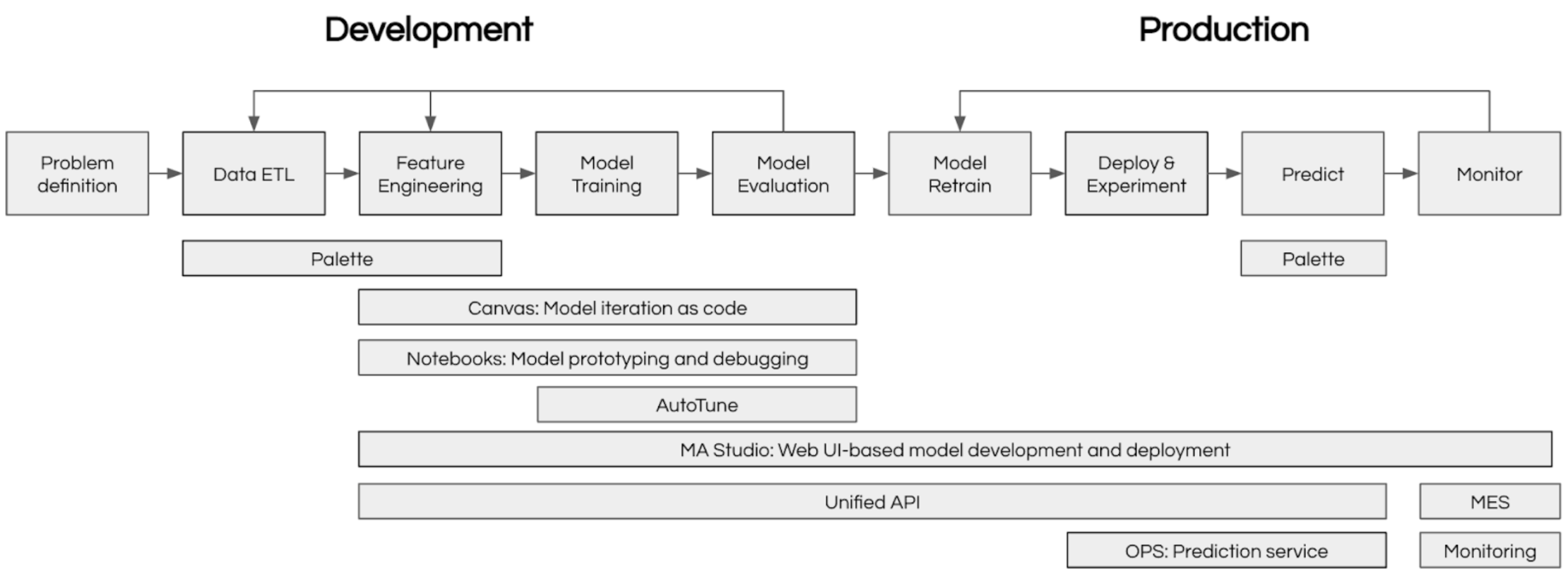
Machine learning at scale requires coordinating many moving parts: data preparation, experiment tracking, model training, deployment, and monitoring. Michelangelo AI provides an integrated ecosystem that handles all of these concerns, enabling teams to focus on building great models rather than managing infrastructure.
The diagram below shows how Michelangelo AI's components work together:
Frequently Asked Questions
Have questions? See the full FAQ — covering getting started, data formats, training, deployment, monitoring, scaling, and collaboration.
What's next?
- Ready to build? Set up your local sandbox and follow the Getting Started with Pipelines guide (~30 min)
- Want to understand the concepts first? Read Core Concepts and Key Terms
- Looking for examples? Browse end-to-end tutorials covering XGBoost, BERT, GPT fine-tuning, and recommendation systems
- Curious where we're headed? Check the Roadmap for release milestones and planned features