System Architecture
Michelangelo AI runs on Kubernetes. Everything you create, such as a pipeline, a pipeline run, or an inference server, is stored as a Kubernetes custom resource, and controllers reconcile each one toward its desired state. This page shows how the pieces fit together and which controller owns which resource.
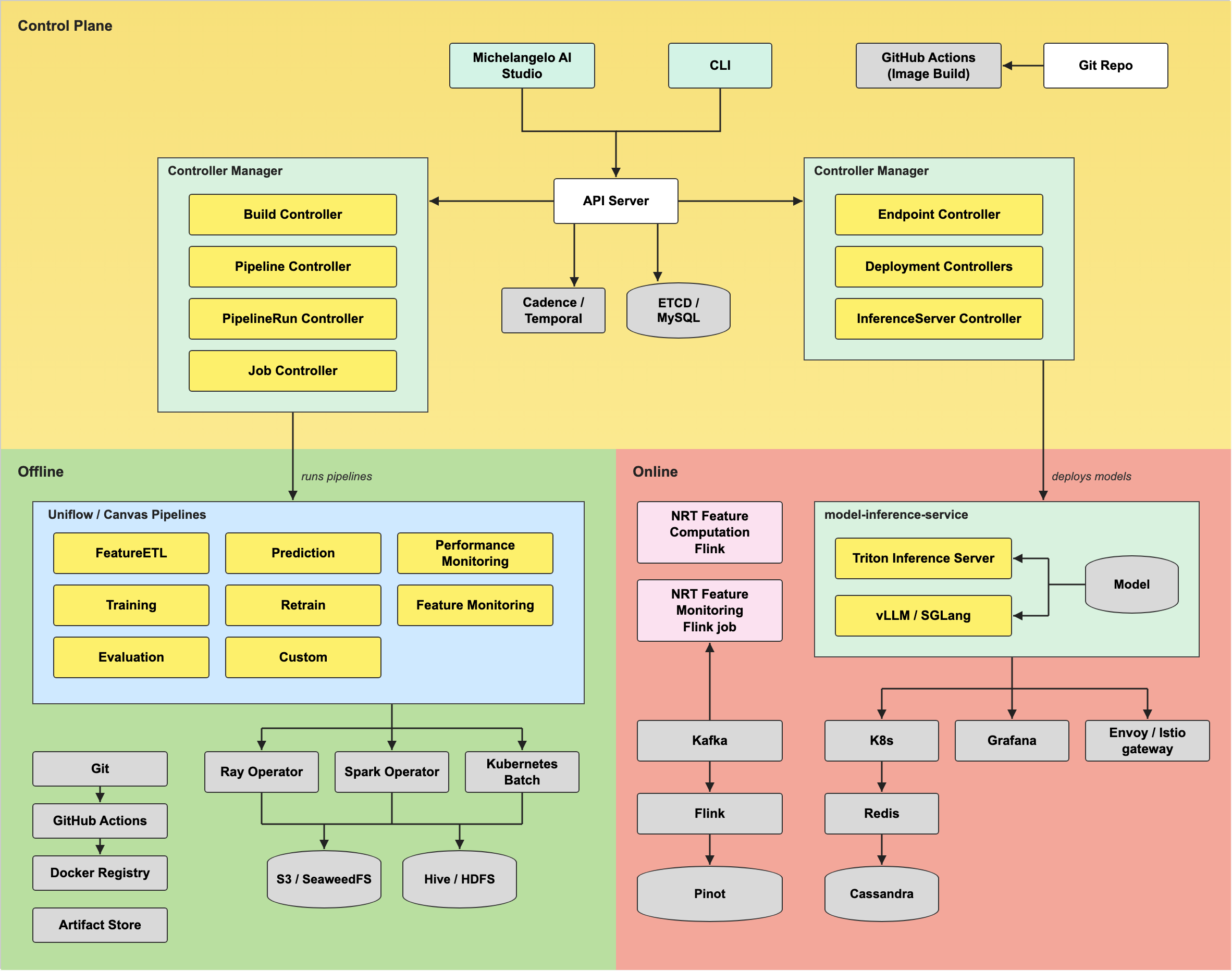
The diagram has three areas: the control plane, the offline side (pipelines, compute, and storage), and the online side (model serving). Some boxes are Michelangelo AI components, and some are external systems a deployment connects to. Integrations and optional components lists which is which.
Control plane
The control plane is what you talk to. It stores resources and runs the controllers that act on them.
- Michelangelo AI Studio and the CLI are the clients. The CLI calls the Michelangelo AI API server over gRPC. Studio sends JSON requests to Envoy, which transcodes them to gRPC for the API server. Neither client calls the Kubernetes API server for resource operations; only
ma sandboxuseskubectl. - API server exposes the gRPC API for each resource kind and persists the resources through Kubernetes. See API Framework.
- Controller manager runs every controller, plus the ingester, in one process. The diagram draws the controllers in two groups: pipelines and jobs, and inference servers and deployments. It also shows image building and endpoint publishing as separate controllers. Neither is: image resolution is a step of the pipeline run controller, and the inference server controller publishes endpoints.
- Workflow engine (Cadence or Temporal) executes the workflows that pipeline runs trigger. The Helm chart can install Cadence or Temporal as an optional subchart, or you can point it at an existing service.
- Metadata storage. Resources live in Kubernetes (etcd). When metadata storage is enabled (
apiserver.metadataStorage.enableandcontrollermgr.metadataStorage.enable, off by default and on in the sandbox), the ingester also copies every resource into MySQL for querying. Immutable kinds (Model,CachedOutput, andEvaluationReport) are then removed from etcd and kept only in MySQL. See Ingester Controller.
Offline: pipelines, compute, and storage
When a pipeline run starts, the pipeline run controller resolves the pipeline's container image and starts the workflow, and the workflow engine runs the pipeline steps. Michelangelo AI does not build the image. You build it beforehand, for example in CI or before ma pipeline apply, and the image is recorded in the pipeline's michelangelo/uniflow-image annotation. The run fails if the annotation is missing. Pipelines are written with Uniflow, Michelangelo AI's Python framework. The diagram shows the common pipeline types: feature ETL, training, evaluation, prediction, retraining, and monitoring, plus custom pipelines.
Pipeline steps run as Ray or Spark jobs on a registered compute cluster:
- Ray jobs and clusters are managed through the
RayJobandRayClusterresources and the KubeRay operator. - Spark jobs are managed through the
SparkJobresource and the Spark operator. - A scheduler assigns jobs to registered clusters. See Jobs Overview.
The diagram also shows Kubernetes batch compute. This repository has no code for plain Kubernetes Job resources; pipeline steps run on Ray or Spark.
Pipelines read and write data and artifacts in S3-compatible object storage. The local sandbox uses SeaweedFS by default, and a production deployment points objectStorage.endpoint at its own S3-compatible store.
Online: model serving
Serving is managed by the InferenceServer and Deployment controllers.
- An InferenceServer provisions the serving infrastructure on a target cluster. Triton Inference Server is the only backend implemented in this repository. The diagram's vLLM and SGLang box, like the other frameworks named in the API, would plug in through the
Backendinterface (see Integrate a Custom Backend). - A Deployment rolls a model out to an inference server, cluster by cluster. A model-sync agent, which runs as a DaemonSet on each node, loads and unloads models on the server. The sandbox installs it; the Helm chart does not.
See Serving Overview for the lifecycle details.
Custom resources (CRDs)
The API server registers these resource kinds at startup from the protobuf definitions in proto/api/v2/. When metadata storage is enabled, the ingester copies all of them to MySQL.
| Kind | What it represents | Reconciled by |
|---|---|---|
Project | A grouping of ML work, with owner information | No controller; an API hook (go/components/project/apihook) validates it and creates its namespace |
Pipeline | A pipeline definition | Pipeline controller (go/components/pipeline) |
Revision | The change history of a resource such as a pipeline, model, or deployment | Revision controller (go/components/revision) |
PipelineRun | One execution of a pipeline | PipelineRun controller (go/components/pipelinerun) |
TriggerRun | A schedule or backfill that starts pipeline runs | TriggerRun controller (go/components/triggerrun) |
CachedOutput | Cached output generated by an ML application | No controller |
Cluster | A registered compute cluster that jobs can run on | Cluster controller (go/components/jobs/cluster) |
RayCluster | A Ray cluster | RayCluster controller (go/components/ray/cluster) |
RayJob | A Ray job | RayJob controller (go/components/ray/job) |
SparkJob | A Spark job | SparkJob controller (go/components/spark/job) |
Model | A registered model | No controller; validated by an API hook (go/components/model/apihook) |
ModelFamily | A sub-problem within a project | No controller |
EvaluationReport | The evaluation results for a model | No controller |
InferenceServer | A serving environment for models | InferenceServer controller (go/components/inferenceserver) |
Deployment | A rollout of a model to an inference server | Deployment controller (go/components/deployment) |
Kinds with no controller are stored and served by the API server, but nothing reconciles them. For the full field definitions, see the .proto files in proto/api/v2/ and the gRPC reference.
Integrations and optional components
The diagram shows a complete production-style deployment. Not everything in it ships with this repository.
- Installed by the Helm chart: the API server, controller manager, worker, Envoy, and UI. Optionally, with
monitoring.enabled: trueand the Grafana Operator or Prometheus Operator CRDs present, it also installs Grafana dashboards, aServiceMonitor, and aPrometheusRule. The chart can optionally install Cadence or Temporal as a subchart. See Helm Chart. - Supplied by you: MySQL for metadata storage, S3-compatible object storage, the KubeRay and Spark operators on each compute cluster, and the model-sync DaemonSet on serving clusters. The chart requires
metadataStorage.hosteven with metadata storage off, because the API server's init containers wait for the database and apply the schema. The sandbox sets up its own object store (SeaweedFS by default), the Ray and Spark operators, model-sync, and the other services it needs. See Sandbox Setup. - Integrations a deployment may use: Pinot, Kafka, Cassandra, Redis, and the near-real-time Flink feature jobs shown in the online area, along with Hive/HDFS, Istio, and a Git and image-build pipeline. This repository has no code or chart for them. Treat them as systems you can connect to Michelangelo AI, not as parts it installs.
Where to go next
- Core Concepts and Key Terms: the vocabulary used on this page.
- Sandbox Setup: run the whole control plane on your laptop.
- Operator Guides: deploy and configure each component.
- Platform Setup: how the server components connect.
- Jobs Overview and Serving Overview: the offline and online runtime in depth.
- Getting Started with ML Pipelines: build and run your first pipeline.